
Artificial intelligence has changed the way students learn, research, and write. In 2026, AI writing tools are no longer limited to generating text. The best AI assistants now help students brainstorm ideas, understand difficult topics, improve grammar, organize research, create study materials, and receive feedback on their writing.
However, with hundreds of AI tools available, choosing the right one can be confusing.
Students searching for the best AI writing tools for students are usually looking for answers to simple questions:
- Which AI writing assistant is best for essays?
- What are the best free AI writing tools for students?
- Which AI tools can help with research and studying?
- Are AI writing tools useful for improving writing skills?
- Which popular AI assistants are worth using in 2026?
The answer depends on what you need.
Some students need help improving grammar and clarity. Others need support with research, outlining, long essays, presentations, or exam preparation.
The most effective students in 2026 are not those who ask AI to do all their work. They use AI as a learning partner — helping them think better, write more clearly, and study more efficiently.
Modern student AI tools are increasingly focused on guided learning rather than simply providing answers. Features such as study modes, research assistance, quizzes, and document analysis are becoming central parts of AI platforms.
In this guide, we compare the best AI writing tools for students in 2026, including free options, popular AI assistants, and specialized tools for writing, editing, research, and studying.
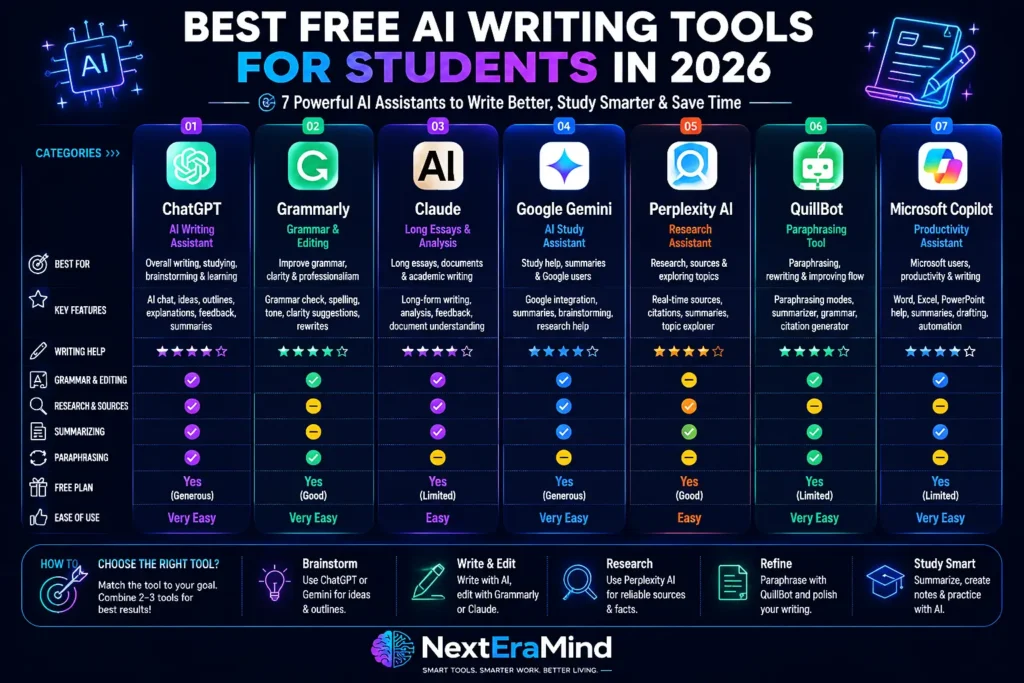
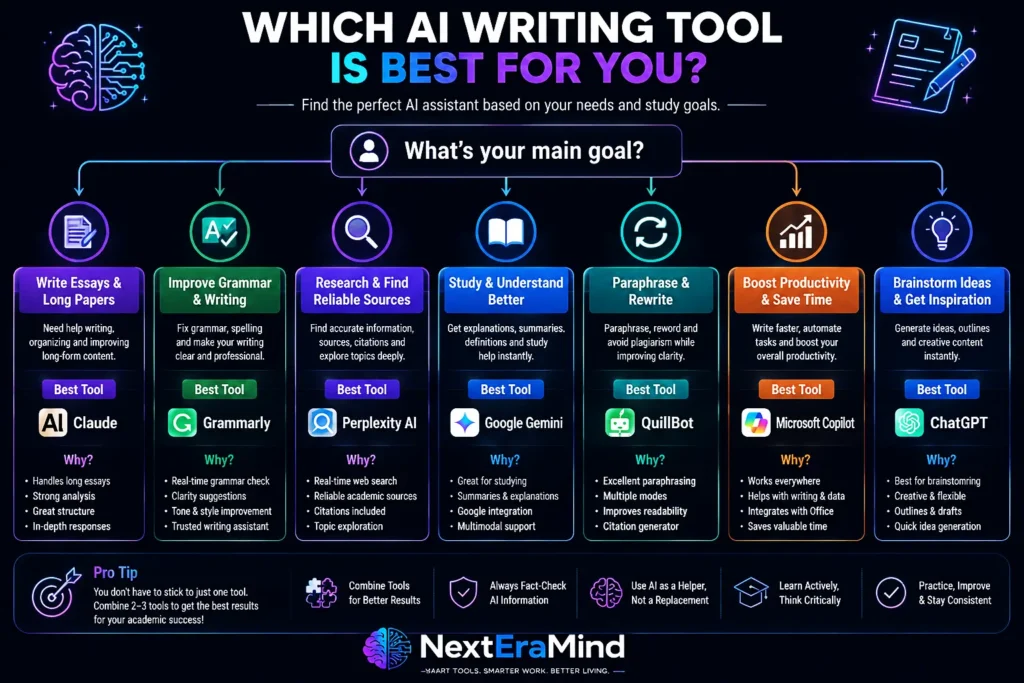
Quick Comparison: Best AI Writing Tools for Students in 2026
| AI Tool | Best For | Free Version | Main Strength |
| ChatGPT | Overall AI writing assistant | Yes | Brainstorming, explanations, outlines, feedback |
| Grammarly | Grammar and editing | Yes | Improving clarity, spelling, and writing style |
| Claude | Long essays and analysis | Yes | Detailed writing feedback and document analysis |
| Google Gemini | Google users and studying | Yes | Research, quizzes, Google Workspace integration |
| Perplexity AI | Research | Yes | Finding information and exploring sources |
| QuillBot | Paraphrasing | Yes | Rewriting and improving readability |
| Microsoft Copilot | Productivity | Yes | Writing assistance inside Microsoft tools |
What Are AI Writing Tools for Students?
AI writing tools are applications powered by artificial intelligence that help students create, improve, organize, and understand written content.
Unlike traditional writing software, modern AI assistants can analyze context, suggest improvements, explain concepts, and provide feedback.
Students can use AI writing tools for:
✓ Brainstorming essay ideas
✓ Creating outlines
✓ Improving grammar
✓ Rewriting unclear sentences
✓ Summarizing notes
✓ Understanding difficult lessons
✓ Researching topics
✓ Reviewing drafts
✓ Preparing presentations
✓ Creating study questions
✓ Improving academic writing skills
The goal is not to replace student effort.
The best use of AI is to support the writing process:
Research → Planning → Writing → Editing → Improving
A student who understands how to use AI responsibly can save time while developing stronger writing and learning skills.
Best Free AI Writing Tools for Students in 2026
One of the biggest reasons students search for the best free AI writing tools for students is simple: they want powerful writing and study support without paying for expensive subscriptions.
Fortunately, many of the most popular AI writing assistants now offer free versions that are useful for everyday student tasks, including brainstorming, editing, research, and study preparation.
However, free does not always mean better.
The right tool depends on your goal:
- Need help starting an essay? → Use an AI brainstorming assistant.
- Need better grammar? → Use an AI editing tool.
- Need research sources? → Use an AI research assistant.
- Need help understanding a difficult topic? → Use a learning-focused AI tool.
The best students in 2026 usually combine two or three tools instead of relying on one AI assistant for everything.
1. ChatGPT — Best Overall AI Writing Assistant for Students
Best for: Writing ideas, essay planning, explanations, feedback, and studying
Free option: Yes
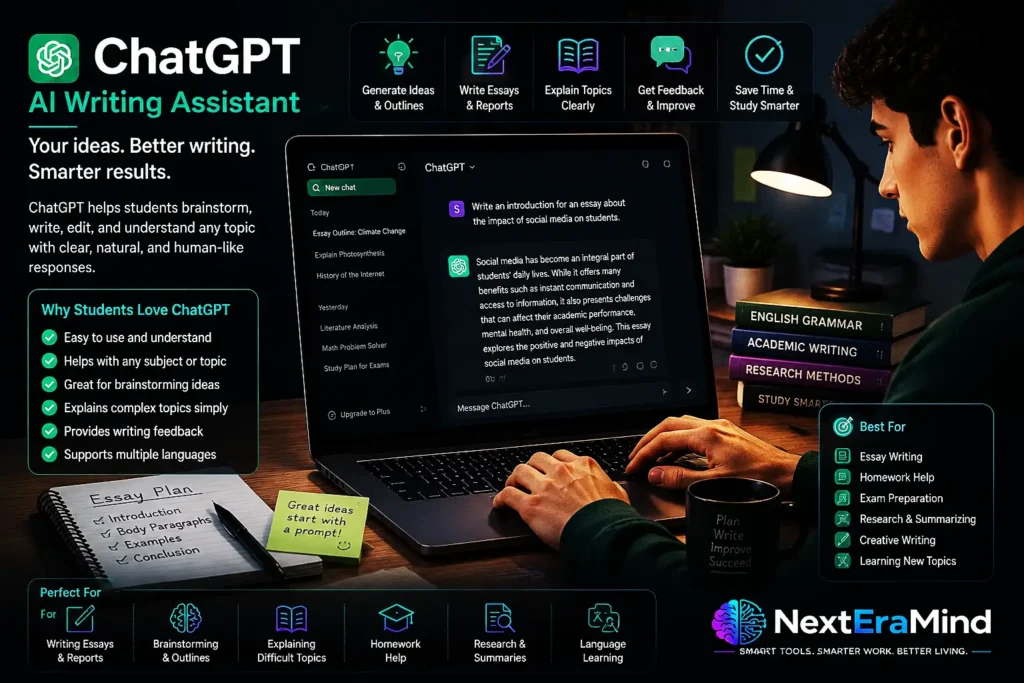
When students search for the best AI writing tools for students 2026, ChatGPT is usually one of the first tools they discover.
Its biggest advantage is flexibility.
Unlike specialized writing tools that focus on one task, ChatGPT can support many parts of the student workflow:
- Generating essay ideas
- Creating outlines
- Explaining difficult concepts
- Reviewing paragraphs
- Improving writing structure
- Creating study questions
- Summarizing notes
- Practicing exams
A student can use ChatGPT as a personal learning assistant instead of simply asking it to generate answers.
For example:
Instead of:
“Write my essay about climate change.”
A better approach:
“Help me create a strong argument for an essay about climate change. Ask me questions that help me develop my own ideas.”
This approach turns AI into a thinking partner.
Modern AI tools are increasingly moving toward guided learning experiences rather than simply producing answers.
Why Students Like ChatGPT
✅ Easy to use
✅ Works for almost every subject
✅ Good for brainstorming
✅ Helps explain difficult topics
✅ Useful for writing feedback
✅ Supports learning conversations
Best for:
Students who want one AI writing assistant that can help with almost everything.
2. Grammarly — Best Free AI Writing Tool for Editing
Best for: Grammar correction, rewriting, clarity, and polishing writing
Free option: Yes
Writing a good first draft is only half the process.
The revision stage is where many students improve their grades.
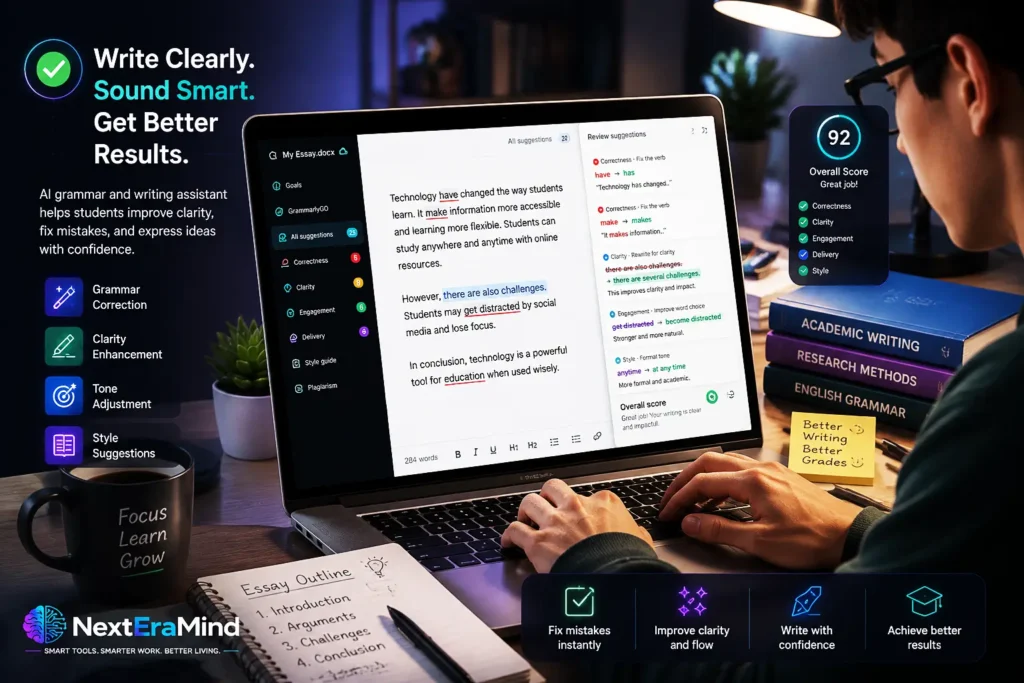
Grammarly is one of the most popular AI writing tools because it focuses on improving writing quality rather than replacing the writer.
It helps students:
- Correct grammar mistakes
- Improve sentence clarity
- Fix spelling errors
- Adjust tone
- Rewrite unclear sentences
- Make writing more professional
For students, Grammarly is especially useful after completing a first draft.
Instead of asking AI to create the assignment, students can write their own ideas and use Grammarly as an editor.
Example:
Before:
“Technology have changed the way students learn because it make information easier.”
After improvement:
“Technology has changed the way students learn because it makes information easier to access.”
Small improvements like these can make academic writing clearer and more professional.
Why Students Like Grammarly
✅ Excellent grammar checking
✅ Easy for beginners
✅ Works while writing
✅ Helps improve English writing skills
✅ Useful for essays and applications
Best for:
Students who want to improve their writing quality and confidence.
3. Claude — Best AI Tool for Long Essays and Academic Writing
Best for: Long documents, analysis, essay feedback, and detailed explanations
Free option: Yes
Students who work on research papers, essays, or long reading assignments often need an AI tool that can handle complex information.
Claude is especially useful for:
- Reviewing long documents
- Improving essay structure
- Analyzing arguments
- Summarizing readings
- Giving detailed writing feedback
Instead of only correcting sentences, Claude can help students think about bigger questions:
- Is my argument clear?
- Does my essay structure make sense?
- Are my ideas supported?
- What weaknesses should I improve?
This makes it valuable for university students and anyone working on longer academic projects.
Why Students Like Claude
✅ Strong long-form writing ability
✅ Good document analysis
✅ Detailed explanations
✅ Helpful essay feedback
Best for:
Students writing longer essays, reports, dissertations, or research projects.
4. Google Gemini — Best AI Study Assistant for Google Users
Best for: Google Docs users, research, summaries, and study help
Free option: Yes
For students already using Google Workspace, Gemini can be a convenient AI assistant because it fits naturally into a Google-based workflow.
Students can use Gemini for:
- Summarizing information
- Creating study notes
- Brainstorming ideas
- Explaining topics
- Organizing information
- Preparing presentations
A student who keeps notes, assignments, and documents inside Google tools may find Gemini especially useful.
Why Students Like Gemini
✅ Works well with Google services
✅ Good for research assistance
✅ Useful for summaries
✅ Helpful for study preparation
Best for: Students who already use Google Docs, Drive, and other Google tools.
5. Perplexity AI — Best AI Research Tool for Students
Best for: Research, sources, and exploring topics
Free option: Yes
Research is often one of the hardest parts of writing.
Students need to find reliable information, understand different viewpoints, and organize sources.
Perplexity is designed around research and information discovery.
Students can use it to:
- Explore a new topic
- Find information quickly
- Discover sources
- Compare ideas
- Create research notes
It is particularly useful during the early stages of writing a research paper.
However, students should always verify sources before using information in academic work.
Why Students Like Perplexity
✅ Research-focused
✅ Helps discover sources
✅ Saves time
✅ Useful for exploring unfamiliar topics
Best for:
Students who need help researching before writing.

6. QuillBot — Best AI Paraphrasing Tool for Students
Best for: Rewriting, paraphrasing, and improving readability
Free option: Yes
Many students struggle with expressing ideas clearly.
QuillBot helps by offering alternative ways to rewrite sentences and improve readability.
Useful applications include:
- Simplifying complex sentences
- Improving sentence flow
- Rewriting awkward phrases
- Summarizing information
However, students should remember:
Paraphrasing does not remove the need for citations.
If an idea comes from another source, that source still needs to be credited.
Best for:
Students who want help improving wording and sentence structure.
7. Microsoft Copilot — Best Free AI Productivity Assistant
Best for: Microsoft Office users
Free option: Yes
Students who use Word, PowerPoint, and Microsoft tools may find Copilot useful for everyday productivity.
It can help with:
- Drafting documents
- Creating summaries
- Organizing ideas
- Improving presentations
- Generating study materials
Best for:
Students already working inside the Microsoft ecosystem.
Quick Recommendation: Which AI Writing Tool Should Students Choose?
Best Overall:
🏆 ChatGPT
Best for Grammar:
🏆 Grammarly
Best for Long Essays:
🏆 Claude
Best for Research:
🏆 Perplexity AI
Best for Google Users:
🏆 Gemini
Best for Paraphrasing:
🏆 QuillBot
Best for Microsoft Users:
🏆 Copilot
Free vs Paid AI Writing Tools for Students in 2026
One of the most common searches related to AI tools is:
“What are the best free AI writing tools for students?”
The good news is that many powerful AI writing assistants offer free versions. For most students, free plans are enough for everyday tasks such as brainstorming, grammar correction, summarizing notes, and improving writing.
However, paid plans usually provide:
- Higher usage limits
- More advanced AI models
- Longer document support
- Faster responses
- Extra research features
- More customization options
Before paying for an AI tool, students should first understand their actual needs.
A student writing occasional essays does not necessarily need a premium AI subscription.
A university student working on research papers, a thesis, or professional writing may benefit more from advanced features.
Best Free AI Writing Tools for Students
| Tool | Free Features | Best Use |
| ChatGPT | AI conversations, brainstorming, explanations | General study help |
| Grammarly | Grammar checking and writing suggestions | Editing |
| Claude | AI writing support and document analysis | Essays and research |
| Gemini | AI assistance and Google integration | Studying and summaries |
| Perplexity | Research answers and sources | Finding information |
| QuillBot | Paraphrasing and summarizing | Rewriting |
| Copilot | AI productivity features | Microsoft users |
Are Paid AI Writing Tools Worth It?
Paid AI tools can be useful if you frequently write, research, or study.
They may be worth considering for:
University students
Students writing:
- Research papers
- Literature reviews
- Reports
- Long essays
- Dissertations
may benefit from better document handling and advanced feedback.
Content creators
Students who also create:
- Blogs
- YouTube scripts
- Newsletters
- Online courses
may benefit from AI content creation features.
Language learners
Students improving English writing may find advanced grammar and rewriting features helpful.
However, paying for AI does not automatically make writing better.
A strong writing process still requires:
- Understanding the topic
- Developing ideas
- Checking information
- Editing carefully
- Adding your own voice
AI Writing Tools for Students Reddit: What Users Usually Recommend
Many students search:
“AI writing tools for students Reddit”
because they want real experiences from other learners.
Although opinions vary, common recommendations usually focus on tools that help with productivity rather than replacing student work.
Students often mention using AI tools for:
Brainstorming ideas
AI can help students overcome writer’s block by suggesting:
- Possible topics
- Research questions
- Essay structures
- Different viewpoints
Understanding difficult concepts
Many students use AI tutors to explain complicated subjects in simpler language.
For example:
“Explain quantum physics like I am a beginner.”
or:
“Explain this economics concept using a real-world example.”
Improving drafts
Students often find AI feedback useful for:
- Identifying unclear sections
- Improving sentence structure
- Finding grammar mistakes
- Making writing easier to understand
Creating study materials
AI tools can help transform notes into:
- Flashcards
- Practice questions
- Study summaries
- Revision guides
The common theme among experienced users is:
AI works best as a study assistant, not as a replacement for learning.
Are Undetectable AI Writing Tools for Students Worth It?
One keyword that many students search is:
“undetectable AI writing tools for students.”
Students often search this because they want AI-generated writing that appears completely human.
However, this approach creates several problems.
First, AI detection tools are not always accurate. They can incorrectly identify human writing as AI-generated and may fail to detect AI-generated content.
Second, trying to hide AI use can create academic integrity issues.
The better approach is not to make AI invisible.
The better approach is to use AI responsibly.
AI can help students:
✅ Understand difficult topics
✅ Improve their writing
✅ Generate ideas
✅ Organize research
✅ Receive feedback
✅ Practice learning skills
But students should still:
✅ Write their own ideas
✅ Verify information
✅ Check sources
✅ Follow school policies
✅ Maintain their personal writing style
The strongest students in 2026 will not be those who avoid AI.
They will be those who know how to use AI intelligently.

How to Use AI Writing Tools Without Cheating
Many students worry:
“Will using AI hurt my learning?”
The answer depends on how you use it.
Good uses of AI:
1. Brainstorming
Ask AI:
“Give me five possible approaches to this essay topic.”
Then choose and develop your own idea.
2. Learning difficult concepts
Ask AI:
“Explain this topic step by step.”
Use it like a tutor.
3. Improving your writing
Give AI your own paragraph and ask:
“How can I make this clearer?”
4. Checking your argument
Ask:
“What weaknesses can you find in my argument?”
5. Creating study materials
Transform your notes into:
- Quiz questions
- Flashcards
- Summaries
Bad uses of AI:
❌ Submitting AI-generated essays as your own
❌ Copying answers without understanding them
❌ Using fake citations
❌ Avoiding learning the subject
AI should make you a better writer, not replace your ability to write.
How to Choose the Best AI Writing Tool for Students
Before choosing an AI assistant, ask yourself:
What do I need help with?
Writing essays?
Choose:
- ChatGPT
- Claude
Improving grammar?
Choose:
- Grammarly
Researching topics?
Choose:
- Perplexity
- Gemini
Rewriting sentences?
Choose:
- QuillBot
Creating presentations?
Choose:
- Gemini
- Copilot
Learning difficult subjects?
Choose:
- ChatGPT
- Gemini
- Claude
The Best AI Writing Workflow for Students in 2026
The most effective approach is not using one tool for everything.
A smart workflow could look like this:
Step 1: Research
Use:
- Perplexity
- Gemini
- ChatGPT
Goal:
Understand the topic and collect ideas.
Step 2: Plan
Use:
- ChatGPT
- Claude
Goal:
Create an outline and organize your argument.
Step 3: Write
Use:
Your own knowledge and ideas.
Goal:
Create an authentic first draft.
Step 4: Improve
Use:
- Grammarly
- QuillBot
Goal:
Fix grammar, clarity, and readability.
Step 5: Review
Check:
- Facts
- Citations
- Sources
- School requirements
Final Verdict: What Are the Best AI Writing Tools for Students in 2026?
After comparing the most popular options, there is no single AI writing tool that is perfect for every student.
The best choice depends on your goals.
🏆 Best Overall AI Writing Tool:
ChatGPT
Best for:
- Brainstorming
- Learning
- Essay planning
- Writing feedback
- Study support
🏆 Best Free AI Writing Tool for Editing:
Grammarly
Best for:
- Grammar
- Clarity
- Sentence improvement
🏆 Best AI Tool for Long Essays:
Claude
Best for:
- Research papers
- Long documents
- Detailed analysis
🏆 Best AI Research Tool:
Perplexity AI
Best for:
- Finding information
- Exploring topics
- Research preparation
🏆 Best AI Study Assistant:
Google Gemini
Best for:
- Google users
- Summaries
- Learning support
🏆 Best AI Paraphrasing Tool:
QuillBot
Best for:
- Rewriting
- Improving readability
The future of student writing is not about replacing human creativity with artificial intelligence.
It is about combining human thinking with AI assistance.
Students who learn to use AI responsibly will have an advantage because they can research faster, organize ideas better, and improve their communication skills.
The best AI writing assistant is not the one that writes everything for you.
It is the one that helps you become a better writer.
Frequently Asked Questions (FAQ)
What is the best AI writing tool for students in 2026?
ChatGPT is the best overall AI writing assistant for most students because it supports brainstorming, explanations, writing feedback, and study assistance.
What are the best free AI writing tools for students?
Popular free options include ChatGPT, Grammarly, Claude, Gemini, Perplexity AI, QuillBot, and Microsoft Copilot.
Can AI writing tools help students write essays?
Yes. AI can help students brainstorm, create outlines, improve grammar, review arguments, and receive feedback. Students should still write their own ideas and follow academic rules.
Are AI writing tools allowed for students?
It depends on the school, teacher, and assignment. Students should always check their institution’s AI policy.
What is the best AI tool for academic research?
Perplexity AI, ChatGPT, Claude, and Gemini can all help students research topics, but important information should always be verified with original sources.
Are undetectable AI writing tools safe for students?
No AI tool can guarantee undetectable writing. Students should focus on using AI responsibly for learning, editing, and research rather than hiding AI-generated work.
Can AI writing tools improve English writing skills?
Yes. AI writing assistants can help students improve vocabulary, grammar, sentence structure, and clarity when used as learning tools.